1# `ghcide` - A library for building Haskell IDE tooling
3Note: `ghcide` was previously called `hie-core`.
5Our vision is that you should build an IDE by combining:
7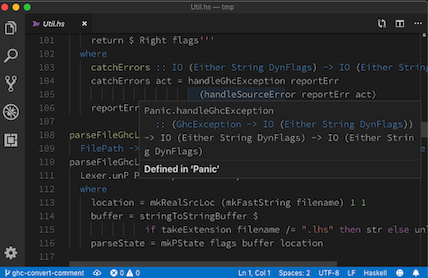
9* [`hie-bios`](https://github.com/mpickering/hie-bios) for determining where your files are, what are their dependencies, what extensions are enabled and so on;
10* `ghcide` (i.e. this library) for defining how to type check, when to type check, and producing diagnostic messages;
11* A bunch of plugins that haven't yet been written, e.g. [`hie-hlint`](https://github.com/ndmitchell/hlint) and [`hie-ormolu`](https://github.com/tweag/ormolu), to choose which features you want;
12* [`haskell-lsp`](https://github.com/alanz/haskell-lsp) for sending those messages to a [Language Server Protocol (LSP)](https://microsoft.github.io/language-server-protocol/) server;
13* An extension for your editor. We provide a [VS Code extension](https://code.visualstudio.com/api) as `extension` in this directory, although the components work in other LSP editors too (see below for instructions using Emacs).
15There are more details about our approach [in this blog post](https://4ta.uk/p/shaking-up-the-ide).
19`ghcide` already exports the following features via the lsp protocol:
23| Display error messages (parse errors, typecheck errors, etc.) and enabled warnings. | diagnostics |
24| Go to definition in local package | definition |
25| Display type and source module of values | hover |
26| Remove redundant imports, replace suggested typos for values and module imports, fill type holes, insert missing type signatures, add suggested ghc extensions | codeAction (quickfix) |
34[See ghcide-nix repository](https://github.com/hercules-ci/ghcide-nix)
36#### With Cabal or Stack
38First install the `ghcide` binary using `stack` or `cabal`, e.g.
401. `git clone https://github.com/digital-asset/ghcide.git`
423. `cabal install` or `stack install` (and make sure `~/.local/bin` is on your `$PATH`)
44It's important that `ghcide` is compiled with the same compiler you use to build your projects.
48Next, check that `ghcide` is capable of loading your code. Change to the project directory and run `ghcide`, which will try and load everything using the same code as the IDE, but in a way that's much easier to understand. For example, taking the example of [`shake`](https://github.com/ndmitchell/shake), running `ghcide` gives some error messages and warnings before reporting at the end:
56 * .\output\docs\Main.hs
57 * .\output\docs\Part_Architecture_md.hs
58Completed (152 worked, 6 failed)
61Of the 158 files in Shake, as of this moment, 152 can be loaded by the IDE, but 6 can't (error messages for the reasons they can't be loaded are given earlier). The failing files are all prototype work or test output, meaning I can confidently use Shake.
63The `ghcide` executable mostly relies on [`hie-bios`](https://github.com/mpickering/hie-bios) to do the difficult work of setting up your GHC environment. If it doesn't work, see [the `hie-bios` manual](https://github.com/mpickering/hie-bios#readme) to get it working. My default fallback is to figure it out by hand and create a `direct` style [`hie.yaml`](https://github.com/ndmitchell/shake/blob/master/hie.yaml) listing the command line arguments to load the project.
65If you can't get `ghcide` working outside the editor, see [this setup troubleshooting guide](docs/Setup.md). Once you have got `ghcide` working outside the editor, the next step is to pick which editor to integrate with.
69You can install the VSCode extension from the [VSCode
70marketplace](https://marketplace.visualstudio.com/items?itemName=DigitalAssetHoldingsLLC.ghcide).
74You can follow the [instructions](https://github.com/moodmosaic/ide-haskell-ghcide#readme) to install with `apm`.
76### Using with Sublime Text
78* Install [LSP](https://packagecontrol.io/packages/LSP)
79* Press Ctrl+Shift+P or Cmd+Shift+P in Sublime Text and search for *Preferences: LSP Settings*, then paste these settings
87 "languageId": "haskell",
88 "command" : ["ghcide", "--lsp"],
89 "scopes" : ["source.haskell"],
90 "syntaxes" : ["Packages/Haskell/Haskell.sublime-syntax"]
98If you don't already have [MELPA](https://melpa.org/#/) package installation configured, visit MELPA [getting started](https://melpa.org/#/getting-started) page to get set up. Then, install [`use-package`](https://melpa.org/#/use-package).
100Now you have a choice of two different Emacs packages which can be used to communicate with the `ghcide` LSP server:
103+ `eglot` (requires Emacs 26.1+)
105In each case, you can enable support by adding the shown lines to your `.emacs`:
114 (global-flycheck-mode t))
115(use-package yasnippet
119 :hook (haskell-mode . lsp)
123 :commands lsp-ui-mode)
124(use-package lsp-haskell
127 (setq lsp-haskell-process-path-hie "ghcide")
128 (setq lsp-haskell-process-args-hie '())
129 ;; Comment/uncomment this line to see interactions between lsp client/server.
130 ;;(setq lsp-log-io t)
140 (add-to-list 'eglot-server-programs '(haskell-mode . ("ghcide" "--lsp"))))
143### Using with Vim/Neovim
145#### LanguageClient-neovim
146Install [LanguageClient-neovim](https://github.com/autozimu/LanguageClient-neovim)
148Add this to your vim config:
150let g:LanguageClient_rootMarkers = ['*.cabal', 'stack.yaml']
151let g:LanguageClient_serverCommands = {
153 \ 'haskell': ['ghcide', '--lsp'],
157Refer to `:he LanguageClient` for more details on usage and configuration.
160Install [vim-lsp](https://github.com/prabirshrestha/vim-lsp).
162Add this to your vim config:
165au User lsp_setup call lsp#register_server({
167 \ 'cmd': {server_info->['/your/path/to/ghcide', '--lsp']},
168 \ 'whitelist': ['haskell'],
172To verify it works move your cursor over a symbol and run `:LspHover`.
176Install [coc.nvim](https://github.com/neoclide/coc.nvim)
178Add this to your coc-settings.json (which you can edit with :CocConfig):
205Here's a nice article on setting up neovim and coc: [Vim and Haskell in
2062019](http://marco-lopes.com/articles/Vim-and-Haskell-in-2019/)
210In the `autocomplete` layer, add the `autocomplete_method` option to force the use of `coc`:
214 name = 'autocomplete'
215 auto-completion-return-key-behavior = "complete"
216 auto-completion-tab-key-behavior = "smart"
218 autocomplete_method = "coc"
221Add this to your coc-settings.json (which you can edit with :CocConfig):
248This example above describes a setup in which `ghcide` is installed
249using `stack install ghcide` within a project.
253To build and work on `ghcide` itself, you can use Stack or cabal, e.g.,
254running `stack test` will execute the test suite.
255If you are using Windows, you should disable the `auto.crlf` setting and configure your editor to use LF line endings, directly or making it use the existing `.editor-config`.
257If you are chasing down test failures, you can use the tasty-rerun feature by running tests as
259 stack --stack-yaml=stack84.yaml test --test-arguments "--rerun"
261This writes a log file called `.tasty-rerun-log` of the failures, and only runs those.
262See the [tasty-rerun](https://hackage.haskell.org/package/tasty-rerun-1.1.17/docs/Test-Tasty-Ingredients-Rerun.html) documentation for other options.
264### Building the extension
266For development, you can also the VSCode extension from this repository (see
267https://code.visualstudio.com/docs/setup/mac for details on adding
268`code` to your `$PATH`):
2723. `npm run vscepackage`
2734. `code --install-extension ghcide-0.0.1.vsix`
275Now opening a `.hs` file should work with `ghcide`.
277## History and relationship to other Haskell IDE's
279The code behind `ghcide` was originally developed by [Digital Asset](https://digitalasset.com/) as part of the [DAML programming language](https://github.com/digital-asset/daml). DAML is a smart contract language targeting distributed-ledger runtimes, based on [GHC](https://www.haskell.org/ghc/) with custom language extensions. The DAML programming language has [an IDE](https://webide.daml.com/), and work was done to separate off a reusable Haskell-only IDE (what is now `ghcide`) which the [DAML IDE then builds upon](https://github.com/digital-asset/daml/tree/master/compiler/damlc). Since that time, there have been various [non-Digital Asset contributors](https://github.com/digital-asset/ghcide/graphs/contributors), in addition to continued investment by Digital Asset. All contributions require a [Contributor License Agreement](https://cla.digitalasset.com/digital-asset/ghcide) that states you license the code under the [Apache License](LICENSE).
281The Haskell community [has](https://github.com/DanielG/ghc-mod) [various](https://github.com/chrisdone/intero) [IDE](https://github.com/rikvdkleij/intellij-haskell) [choices](http://leksah.org/), but the one that has been gathering momentum is [`haskell-ide-engine`](https://github.com/haskell/haskell-ide-engine#readme). Our project owes a debt of gratitude to the `haskell-ide-engine`. We reuse libraries from their ecosystem, including [`hie-bios`](https://github.com/mpickering/hie-bios#readme) (a likely future environment setup layer in `haskell-ide-engine`), [`haskell-lsp`](https://github.com/alanz/haskell-lsp#readme) and [`lsp-test`](https://github.com/bubba/lsp-test#readme) (the `haskell-ide-engine` [LSP protocol](https://microsoft.github.io/language-server-protocol/) pieces). We make heavy use of their contributions to GHC itself, in particular the work to make GHC take string buffers rather than files. While `ghcide` is not a part of `haskell-ide-engine`, we feel it _could_ form the core of a future version - but such decisions are up to the `haskell-ide-engine` contributors.
283The best summary of the architecture of `ghcide` is available [this talk](https://www.youtube.com/watch?v=cijsaeWNf2E&list=PLxxF72uPfQVRdAsvj7THoys-nVj-oc4Ss) ([slides](https://ndmitchell.com/downloads/slides-making_a_haskell_ide-07_sep_2019.pdf)), given at [MuniHac 2019](https://munihac.de/2019.html). However, since that talk the project has renamed from `hie-core` to `ghcide`, and the repo has moved to [this location](https://github.com/digital-asset/ghcide/).
keysesc to close
- j k
- move down, up
- enter
- open
- esc
- back, or up a level
- 1 2 3 4
- readme, files, commits, refs
- /
- filter
- y
- copy the clone command
- c
- compare the chosen commit with another (or shift-click both)
- ?
- show or hide this list