1# `ghcide` - A library for building Haskell IDE tooling
3Note: `ghcide` was previously called `hie-core`.
5Our vision is that you should build an IDE by combining:
7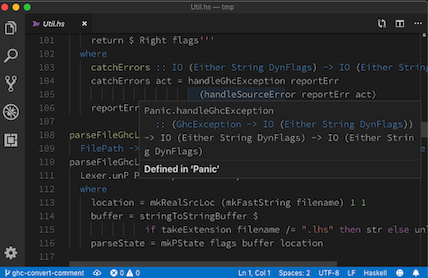
9* [`hie-bios`](https://github.com/mpickering/hie-bios) for determining where your files are, what are their dependencies, what extensions are enabled and so on;
10* `ghcide` (i.e. this library) for defining how to type check, when to type check, and producing diagnostic messages;
11* A bunch of plugins that haven't yet been written, e.g. [`hie-hlint`](https://github.com/ndmitchell/hlint) and [`hie-ormolu`](https://github.com/tweag/ormolu), to choose which features you want;
12* [`haskell-lsp`](https://github.com/alanz/haskell-lsp) for sending those messages to a [Language Server Protocol (LSP)](https://microsoft.github.io/language-server-protocol/) server;
13* An extension for your editor. We provide a [VS Code extension](https://code.visualstudio.com/api) as `extension` in this directory, although the components work in other LSP editors too (see below for instructions using Emacs).
15There are more details about our approach [in this blog post](https://4ta.uk/p/shaking-up-the-ide).
19`ghcide` already exports the following features via the lsp protocol:
23| Display error messages (parse errors, typecheck errors, etc.) and enabled warnings. | diagnostics |
24| Go to definition in local package | definition |
25| Display type and source module of values | hover |
26| Remove redundant imports, replace suggested typos for values and module imports, fill type holes, insert missing type signatures, add suggested ghc extensions | codeAction (quickfix) |
29## Limitations to Multi-Component support
31`ghcide` supports loading multiple components into the same session so that
32features such as go-to definition work across components. However, there are
33some limitations to this.
351. You will get much better results currently manually specifying the hie.yaml file.
36Until tools like cabal and stack provide the right interface to support multi-component
37projects, it is always advised to specify explicitly how your project partitions.
382. Cross-component features only work if you have loaded at least one file
403. There is a known issue where if you have three components, such that A depends on B which depends on C
41then if you load A and C into the session but not B then under certain situations you
42can get strange errors about a type coming from two different places. See [this repo](https://github.com/fendor/ghcide-bad-interface-files) for
43a simple reproduction of the bug.
51Note that you need to compile `ghcide` with the same `ghc` as the project you are working on.
531. If the `ghc` you are using matches the version (or better is) from `nixpkgs` it‘s easiest to use the `ghcide` from `nixpkgs`. You can do so via
55 nix-env -iA haskellPackages.ghcide
57 or e.g. including `pkgs.haskellPackages.ghcide` in your projects `shell.nix`.
58 Depending on your `nixpkgs` channel that might not be the newest `ghcide`, though.
602. If your `ghc` does not match nixpkgs you should try the [ghcide-nix repository](https://github.com/cachix/ghcide-nix)
61 which provides a `ghcide` via the `haskell.nix` infrastructure.
63#### With Cabal or Stack
65First install the `ghcide` binary using `stack` or `cabal`, e.g.
671. `git clone https://github.com/digital-asset/ghcide.git`
693. `cabal install` or `stack install` (and make sure `~/.local/bin` is on your `$PATH`)
71It's important that `ghcide` is compiled with the same compiler you use to build your projects.
75Next, check that `ghcide` is capable of loading your code. Change to the project directory and run `ghcide`, which will try and load everything using the same code as the IDE, but in a way that's much easier to understand. For example, taking the example of [`shake`](https://github.com/ndmitchell/shake), running `ghcide` gives some error messages and warnings before reporting at the end:
83 * .\output\docs\Main.hs
84 * .\output\docs\Part_Architecture_md.hs
85Completed (152 worked, 6 failed)
88Of the 158 files in Shake, as of this moment, 152 can be loaded by the IDE, but 6 can't (error messages for the reasons they can't be loaded are given earlier). The failing files are all prototype work or test output, meaning I can confidently use Shake.
90The `ghcide` executable mostly relies on [`hie-bios`](https://github.com/mpickering/hie-bios) to do the difficult work of setting up your GHC environment. If it doesn't work, see [the `hie-bios` manual](https://github.com/mpickering/hie-bios#readme) to get it working. My default fallback is to figure it out by hand and create a `direct` style [`hie.yaml`](https://github.com/ndmitchell/shake/blob/master/hie.yaml) listing the command line arguments to load the project.
92If you can't get `ghcide` working outside the editor, see [this setup troubleshooting guide](docs/Setup.md). Once you have got `ghcide` working outside the editor, the next step is to pick which editor to integrate with.
94### Optimal project setup
96`ghcide` has been designed to handle projects with hundreds or thousands of modules. If `ghci` can handle it, then `ghcide` should be able to handle it. The only caveat is that this currently requires GHC >= 8.6, and that the first time a module is loaded in the editor will trigger generation of support files in the background if those do not already exist.
100You can install the VSCode extension from the [VSCode
101marketplace](https://marketplace.visualstudio.com/items?itemName=DigitalAssetHoldingsLLC.ghcide).
105You can follow the [instructions](https://github.com/moodmosaic/ide-haskell-ghcide#readme) to install with `apm`.
107### Using with Sublime Text
109* Install [LSP](https://packagecontrol.io/packages/LSP)
110* Press Ctrl+Shift+P or Cmd+Shift+P in Sublime Text and search for *Preferences: LSP Settings*, then paste these settings
118 "languageId": "haskell",
119 "command" : ["ghcide", "--lsp"],
120 "scopes" : ["source.haskell"],
121 "syntaxes" : ["Packages/Haskell/Haskell.sublime-syntax"]
129If you don't already have [MELPA](https://melpa.org/#/) package installation configured, visit MELPA [getting started](https://melpa.org/#/getting-started) page to get set up. Then, install [`use-package`](https://melpa.org/#/use-package).
131Now you have a choice of two different Emacs packages which can be used to communicate with the `ghcide` LSP server:
134+ `eglot` (requires Emacs 26.1+)
136In each case, you can enable support by adding the shown lines to your `.emacs`:
145 (global-flycheck-mode t))
146(use-package yasnippet
150 :hook (haskell-mode . lsp)
154 :commands lsp-ui-mode)
155(use-package lsp-haskell
158 (setq lsp-haskell-process-path-hie "ghcide")
159 (setq lsp-haskell-process-args-hie '())
160 ;; Comment/uncomment this line to see interactions between lsp client/server.
161 ;;(setq lsp-log-io t)
171 (add-to-list 'eglot-server-programs '(haskell-mode . ("ghcide" "--lsp"))))
174### Using with Vim/Neovim
176#### LanguageClient-neovim
177Install [LanguageClient-neovim](https://github.com/autozimu/LanguageClient-neovim)
179Add this to your vim config:
181let g:LanguageClient_rootMarkers = ['*.cabal', 'stack.yaml']
182let g:LanguageClient_serverCommands = {
184 \ 'haskell': ['ghcide', '--lsp'],
188Refer to `:he LanguageClient` for more details on usage and configuration.
191Install [vim-lsp](https://github.com/prabirshrestha/vim-lsp).
193Add this to your vim config:
196au User lsp_setup call lsp#register_server({
198 \ 'cmd': {server_info->['/your/path/to/ghcide', '--lsp']},
199 \ 'whitelist': ['haskell'],
203To verify it works move your cursor over a symbol and run `:LspHover`.
207Install [coc.nvim](https://github.com/neoclide/coc.nvim)
209Add this to your coc-settings.json (which you can edit with :CocConfig):
236Here's a nice article on setting up neovim and coc: [Vim and Haskell in
2372019](http://marco-lopes.com/articles/Vim-and-Haskell-in-2019/) (this is actually for haskell-ide, not ghcide)
239Here is a Docker container that pins down the build and configuration for
240Neovim and ghcide on a minimal Debian 10 base system:
241[docker-ghcide-neovim](https://github.com/carlohamalainen/docker-ghcide-neovim/).
245In the `autocomplete` layer, add the `autocomplete_method` option to force the use of `coc`:
249 name = 'autocomplete'
250 auto-completion-return-key-behavior = "complete"
251 auto-completion-tab-key-behavior = "smart"
253 autocomplete_method = "coc"
256Add this to your coc-settings.json (which you can edit with :CocConfig):
283This example above describes a setup in which `ghcide` is installed
284using `stack install ghcide` within a project.
286### Using with Kakoune
288Install [kak-lsp](https://github.com/ul/kak-lsp).
290Change `kak-lsp.toml` to include this:
294filetypes = ["haskell"]
295roots = ["Setup.hs", "stack.yaml", "*.cabal", "cabal.project", "hie.yaml"]
302To build and work on `ghcide` itself, you can use Stack or cabal, e.g.,
303running `stack test` will execute the test suite.
304If you are using Windows, you should disable the `auto.crlf` setting and configure your editor to use LF line endings, directly or making it use the existing `.editor-config`.
306If you are chasing down test failures, you can use the tasty-rerun feature by running tests as
308 stack --stack-yaml=stack84.yaml test --test-arguments "--rerun"
310This writes a log file called `.tasty-rerun-log` of the failures, and only runs those.
311See the [tasty-rerun](https://hackage.haskell.org/package/tasty-rerun-1.1.17/docs/Test-Tasty-Ingredients-Rerun.html) documentation for other options.
313### Building the extension
315For development, you can also the VSCode extension from this repository (see
316https://code.visualstudio.com/docs/setup/mac for details on adding
317`code` to your `$PATH`):
3213. `npm run vscepackage`
3224. `code --install-extension ghcide-0.0.1.vsix`
324Now opening a `.hs` file should work with `ghcide`.
326## History and relationship to other Haskell IDE's
328The teams behind this project and the [`haskell-ide-engine`](https://github.com/haskell/haskell-ide-engine#readme) have agreed to join forces under the [`haskell-language-server` project](https://github.com/haskell/haskell-language-server), see the [original announcement](https://neilmitchell.blogspot.com/2020/01/one-haskell-ide-to-rule-them-all.html). The technical work is ongoing, with the likely model being that this project serves as the core, while plugins and integrations are kept in the [`haskell-language-server` project](https://github.com/haskell/haskell-language-server).
330The code behind `ghcide` was originally developed by [Digital Asset](https://digitalasset.com/) as part of the [DAML programming language](https://github.com/digital-asset/daml). DAML is a smart contract language targeting distributed-ledger runtimes, based on [GHC](https://www.haskell.org/ghc/) with custom language extensions. The DAML programming language has [an IDE](https://webide.daml.com/), and work was done to separate off a reusable Haskell-only IDE (what is now `ghcide`) which the [DAML IDE then builds upon](https://github.com/digital-asset/daml/tree/master/compiler/damlc). Since that time, there have been various [non-Digital Asset contributors](https://github.com/digital-asset/ghcide/graphs/contributors), in addition to continued investment by Digital Asset. All contributions require a [Contributor License Agreement](https://cla.digitalasset.com/digital-asset/ghcide) that states you license the code under the [Apache License](LICENSE).
332The Haskell community [has](https://github.com/DanielG/ghc-mod) [various](https://github.com/chrisdone/intero) [IDE](https://github.com/rikvdkleij/intellij-haskell) [choices](http://leksah.org/), but the one that had been gathering momentum is [`haskell-ide-engine`](https://github.com/haskell/haskell-ide-engine#readme). Our project owes a debt of gratitude to the `haskell-ide-engine`. We reuse libraries from their ecosystem, including [`hie-bios`](https://github.com/mpickering/hie-bios#readme) (a likely future environment setup layer in `haskell-ide-engine`), [`haskell-lsp`](https://github.com/alanz/haskell-lsp#readme) and [`lsp-test`](https://github.com/bubba/lsp-test#readme) (the `haskell-ide-engine` [LSP protocol](https://microsoft.github.io/language-server-protocol/) pieces). We make heavy use of their contributions to GHC itself, in particular the work to make GHC take string buffers rather than files.
334The best summary of the architecture of `ghcide` is available [this talk](https://www.youtube.com/watch?v=cijsaeWNf2E&list=PLxxF72uPfQVRdAsvj7THoys-nVj-oc4Ss) ([slides](https://ndmitchell.com/downloads/slides-making_a_haskell_ide-07_sep_2019.pdf)), given at [MuniHac 2019](https://munihac.de/2019.html). However, since that talk the project has renamed from `hie-core` to `ghcide`, and the repo has moved to [this location](https://github.com/digital-asset/ghcide/).
keysesc to close
- j k
- move down, up
- enter
- open
- esc
- back, or up a level
- 1 2 3 4
- readme, files, commits, refs
- /
- filter
- y
- copy the clone command
- c
- compare the chosen commit with another (or shift-click both)
- ?
- show or hide this list