3(Currently not fully documented, see the [keymappings](./keymap.md) list for more.)
7Functionality similar to [vim-surround](https://github.com/tpope/vim-surround) is built into
8helix. The keymappings have been inspired from [vim-sandwich](https://github.com/machakann/vim-sandwich):
10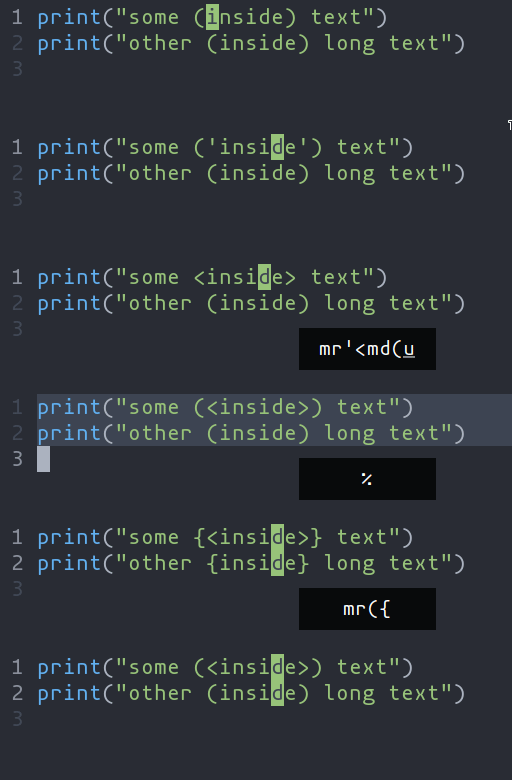
12- `ms` - Add surround characters
13- `mr` - Replace surround characters
14- `md` - Delete surround characters
16`ms` acts on a selection, so select the text first and use `ms<char>`. `mr` and `md` work
17on the closest pairs found and selections are not required; use counts to act in outer pairs.
19It can also act on multiple seletions (yay!). For example, to change every occurance of `(use)` to `[use]`:
21- `%` to select the whole file
22- `s` to split the selections on a search term
23- Input `use` and hit Enter
24- `mr([` to replace the parens with square brackets
26Multiple characters are currently not supported, but planned.
keysesc to close
- j k
- move down, up
- enter
- open
- esc
- back, or up a level
- 1 2 3 4
- readme, files, commits, refs
- /
- filter
- y
- copy the clone command
- c
- compare the chosen commit with another (or shift-click both)
- ?
- show or hide this list