3(Currently not fully documented, see the [keymappings](./keymap.md) list for more.)
7Vim-like registers can be used to yank and store text to be pasted later. Usage is similar, with `"` being used to select a register:
9- `"ay` - Yank the current selection to register `a`.
10- `"op` - Paste the text in register `o` after the selection.
12If there is a selected register before invoking a change or delete command, the selection will be stored in the register and the action will be carried out:
14- `"hc` - Store the selection in register `h` and then change it (delete and enter insert mode).
15- `"md` - Store the selection in register `m` and delete it.
19| Register character | Contains |
22| `:` | Last executed command |
23| `"` | Last yanked text |
25> There is no special register for copying to system clipboard, instead special commands and keybindings are provided. See the [keymap](keymap.md#space-mode) for the specifics.
29Functionality similar to [vim-surround](https://github.com/tpope/vim-surround) is built into
30helix. The keymappings have been inspired from [vim-sandwich](https://github.com/machakann/vim-sandwich):
32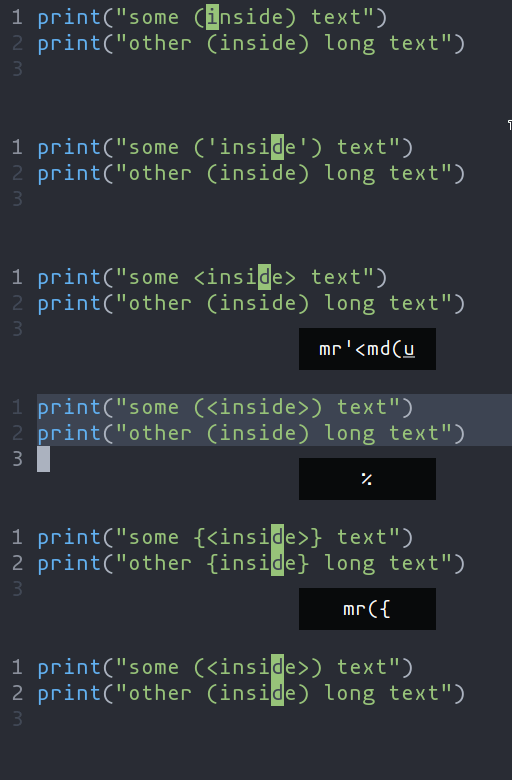
34- `ms` - Add surround characters
35- `mr` - Replace surround characters
36- `md` - Delete surround characters
38`ms` acts on a selection, so select the text first and use `ms<char>`. `mr` and `md` work
39on the closest pairs found and selections are not required; use counts to act in outer pairs.
41It can also act on multiple seletions (yay!). For example, to change every occurance of `(use)` to `[use]`:
43- `%` to select the whole file
44- `s` to split the selections on a search term
45- Input `use` and hit Enter
46- `mr([` to replace the parens with square brackets
48Multiple characters are currently not supported, but planned.
52Currently supported: `word`, `surround`.
54
56- `ma` - Select around the object (`va` in vim, `<alt-a>` in kakoune)
57- `mi` - Select inside the object (`vi` in vim, `<alt-i>` in kakoune)
59| Key after `mi` or `ma` | Textobject selected |
62| `(`, `[`, `'`, etc | Specified surround pairs |
64Textobjects based on treesitter, like `function`, `class`, etc are planned.
keysesc to close
- j k
- move down, up
- enter
- open
- esc
- back, or up a level
- 1 2 3 4
- readme, files, commits, refs
- /
- filter
- y
- copy the clone command
- c
- compare the chosen commit with another (or shift-click both)
- ?
- show or hide this list